


ChowNow: Local Food Ordering
4.61.22K Reviews
App Specs
- Version
- 1.70.0
- Updated On
- License
- Free
- Downloads
- 500,000+
- Developer
- ChowNow
- Categories
- Food & Drink
- Platform
- Android, iOS
Screenshots
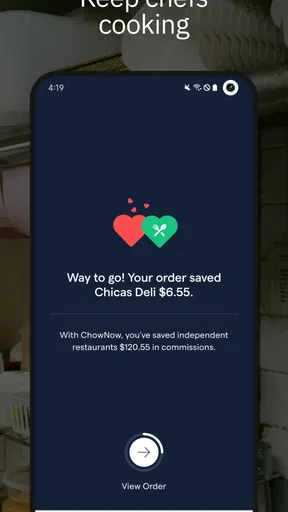
 Analysis by AppCompare
I approached ChowNow: Local Food Ordering as someone trying to solve a very ordinary problem: finding a nearby meal without turning the process into a long search through restaurant websites, phone calls, and delivery apps. It is a free Food & Drink app from ChowNow, and its main appeal is straightforward: it brings local takeout ordering into one place while keeping the restaurant at the center of the experience.
That sounds simple, but simplicity matters when I am hungry, ordering for several people, or trying to arrange dinner from somewhere unfamiliar. My first impression was that the app makes the most sense for pickup and local ordering rather than for people who want a giant marketplace filled with every possible restaurant. The experience depends on what is available around you, so its usefulness is closely tied to your location and the participating restaurants nearby.
The app has a 4.6 average from around 8,100 ratings, with roughly 1,200 written reviews and more than 500,000 installs. Those figures suggest that it has found a solid audience, but I would not treat them as a promise that every local search will feel equally full. A food-ordering app can be excellent in one neighborhood and much less useful a few miles away.
Getting from installation to a first order
I’ll focus on the first-order journey: choosing the right area, narrowing the restaurant options, and building a straightforward basket before checkout. One useful way to make that first run less stressful is to treat it as a test of the whole local ordering path, not just a search for dinner; that makes it easier to spot where the app fits your routine.
What to expect before you browse
The first thing I would tell a new user is to think of ChowNow as a local ordering tool, not as a universal restaurant directory. Its value appears when nearby restaurants use the service and their menus are available through it. That distinction affects your expectations immediately: you may find a convenient selection in one area, while another location may offer fewer practical choices.
The store identifies the app simply as ChowNow, while the fuller product name, ChowNow: Local Food Ordering, better explains its purpose. I found that useful because the app is not trying to be a recipe service, a restaurant review community, or a grocery-shopping assistant. Its job is to help you move from deciding what to eat to placing a local takeout order.
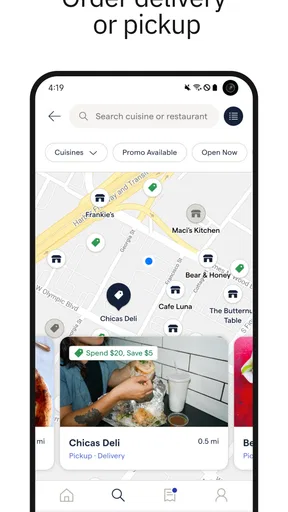
For a first-time user, the best starting point is a meal you already know you want rather than an open-ended search for inspiration. If I am craving a particular type of food, I can use the app with a clear goal: check nearby options, inspect the menu, decide between pickup or the available ordering choices, and complete the order. That approach reduces the chance of browsing endlessly without reaching the useful part.
Worth Reading Before You Choose

EA SPORTS FC Mobile 26 Is a Bigger Football Game, but It Takes Time

Flipboard Shows What News Apps Must Do Beyond the Feed

Switching to Android Auto Means Rethinking Your Driving Routine

Google Calendar Makes a Crowded Week Easier to Manage

Ludo King Makes the Most of the Minutes Between Plans

Baby Panda World Brings Quick Play to Modern Phones, but Its Game Library Feels Busy
ChowNow is rated for Everyone, which makes it approachable for a broad audience. It was released on April 20, 2020, and the current version is 1.70.0. It supports Android 9 and later, so anyone using an older device should check compatibility before planning around it. The app itself costs nothing to install, although the final cost of a meal naturally depends on the restaurant and the order you choose.
Setting up without overthinking it
I recommend starting with your actual ordering location, especially if you are away from home, staying in a hotel, or arranging food for someone else. Local ordering tools can show very different results when the location changes, and choosing the wrong area can make the app appear less useful than it really is.
Once the local area is set, I would browse a few restaurants before committing to the first appealing option. This is not only about finding the lowest total. It also helps reveal which menus are complete, which restaurants suit pickup, and which choice is realistic for the time you have. A quick comparison at the beginning is usually more efficient than placing an order and then discovering that another nearby option would have worked better.
One practical habit is to read the menu as a complete order rather than looking only at the main dish. I pay attention to sides, drinks, add-ons, and customization choices before reaching the final stage. This matters because a meal that looks inexpensive or simple at first can change once the rest of the order is assembled. Checking the basket before confirming is one of the easiest ways to avoid an unwanted surprise.
I also suggest keeping the first order uncomplicated. Choose a familiar meal, avoid several special requests, and use the first experience to learn how the restaurant presents its menu inside the app. That gives you a cleaner test of the ordering flow. If the first attempt involves a large group, many substitutions, and an unfamiliar restaurant, it becomes harder to tell whether a problem came from the app or from the complexity of the order.
The first meaningful success
For me, the first successful action is not merely opening a restaurant page. It is reaching a clear decision and completing an order that matches what I intended to buy. The path is easiest when I search locally, open a restaurant that genuinely fits the occasion, review the menu carefully, add the meal, and check the order details before submitting.
A realistic example would be a weekday evening when I finish work later than expected and do not want to cook. I can open ChowNow, look for a nearby restaurant, compare a couple of menus, and choose pickup if I am already heading past that area. In that situation, the app is useful because it turns an otherwise scattered task into one focused session. I am not trying to discover the best restaurant in the entire city; I am trying to make a good dinner decision quickly.
For a family or group order, I would use a slightly different workflow. I would decide the restaurant first, then build the basket slowly while checking each person’s choices. Before placing the order, I would review quantities and customizations as if I were reading the receipt aloud. This is a small discipline, but it is especially valuable when several similar items are involved.
Another useful scenario is ordering from a local restaurant you want to support directly rather than defaulting to a broad delivery marketplace. ChowNow’s focus makes that comparison relevant. If the restaurant you want is available, the app can provide a more direct-feeling route to the menu and order. I would still compare the available fulfillment choices and the final total, because convenience and value are not always the same thing.
Where new users can get confused
The biggest point of confusion is assuming that every restaurant in the area will appear. ChowNow is not automatically a complete map of all local food businesses. Its selection is shaped by the restaurants using the service and by what is available in your chosen location. If your favorite place does not appear, that does not necessarily mean the app is malfunctioning; it may simply not be part of the local selection.
Another possible misunderstanding is treating a restaurant page as a full review guide. The app helps with ordering, but I would not install it expecting the same kind of deep community discussion, photography, or broad discovery tools that a dedicated restaurant-discovery service might offer. When I already know where I want to eat, this focus is a strength. When I want extensive research before choosing, another app may be a better companion.
Pickup and delivery can also create different expectations. I always check which option I am selecting and read the final order screen carefully. A person rushing through the process may assume that choosing a restaurant automatically means delivery, while another user may prefer pickup and accidentally select the wrong route. The safest habit is to confirm the fulfillment method before submitting rather than relying on memory from a previous order.
Menu wording deserves attention too. Restaurants control much of the practical information customers use to choose a meal, so descriptions, options, and availability may vary from one restaurant page to another. If an item has an important ingredient or customization, I would inspect the choices closely and contact the restaurant when a question cannot be resolved from the menu. The app can organize the order, but it cannot replace sensible checking when dietary needs are serious.
Small habits that make the app more useful
My first non-obvious tip is to use ChowNow as a decision filter rather than a passive catalog. Before opening it, decide whether your priority is speed, pickup convenience, a particular cuisine, or ordering from a restaurant you already trust. Then judge the available options against that priority. This prevents the familiar food-app problem of confusing a long list with a useful choice.
My second tip is to separate restaurant comparison from basket building. I would open a few promising menus, note which one actually fits the occasion, and only then start adding items. Building a basket too early can make switching restaurants feel like wasted work, even when another menu is clearly better for the group.
My third tip is to treat the confirmation screen as a final checklist, not a formality. I look at the restaurant, items, quantities, customizations, and selected fulfillment method in one pass. This is particularly helpful when ordering for someone else, because the person receiving the meal may care about details that are easy to overlook during a rushed order.
A fourth useful approach is to keep the app for repeat situations where it saves the most time. If I find a local restaurant that works well for pickup, returning to that choice on another busy evening is more efficient than starting a city-wide search again. The benefit grows through familiarity: I learn which menu items suit my household and which ordering routine causes the least friction.
How it compares with familiar alternatives
Compared with calling a restaurant, ChowNow gives me a more structured way to inspect the menu and assemble an order. That is helpful when I need to compare options or place a detailed order without explaining every item aloud. A phone call can still be better for unusual requests, complicated dietary questions, or situations where the restaurant’s staff can clarify something the menu does not.
Compared with large delivery marketplaces, the appeal is its local focus and more direct ordering purpose. A broad marketplace may offer a larger selection, more delivery-oriented browsing, or stronger tools for comparing many restaurants at once. ChowNow can be the better fit when the restaurant I want is available and I prefer a focused route to that local menu. If selection is my main concern, I would check the broader marketplace instead.
Compared with ordering through separate restaurant websites, the app can reduce the need to remember several different ordering paths. That convenience is real, but it does not remove the need to compare the final details. Some users will prefer a restaurant’s own website if they already have a reliable routine there, while others will appreciate having local choices gathered in one app.
Who should use it, and who should skip it
I think ChowNow is a strong match for people who order takeout regularly, prefer local restaurants, and want a straightforward mobile path from browsing to checkout. It is also useful for households that frequently coordinate meals, provided someone takes a moment to review the basket before confirming. Pickup-oriented users may find it especially practical when they are already traveling near the restaurant.
I would be more cautious if you live in an area with limited participating restaurants or if your priority is the widest possible delivery coverage. The same applies if you mainly want restaurant discovery, detailed reviews, or extensive comparison tools rather than ordering. In those cases, a broader marketplace or a dedicated discovery app may serve you better, with ChowNow remaining a secondary option for specific local restaurants.
People with strict dietary requirements should also use judgment. I would not rely on a short menu description alone when an ingredient could create a serious problem. The app may make the ordering process easier, but confirming details with the restaurant is still the responsible step when the stakes are high.
My next-step recommendation
After the first order, I would not judge the app only by how many restaurants appear. I would judge whether it helps me complete the kind of order I actually make: a quick pickup after work, a familiar meal for the household, or a local order that I would otherwise place by phone. That is where its focused design has the clearest value.
I also recommend updating to the current version, 1.70.0, when the device offers the option, while remembering that Android 9 is the minimum supported operating system. Keeping the app current is a sensible way to avoid using an older build when the ordering experience has changed.
My honest view is that ChowNow is most convincing when used deliberately. It is not the answer to every food-search problem, and it should not be mistaken for a complete restaurant research platform. But when a nearby participating restaurant is the goal, the app offers a clean, approachable route to local takeout. For a first-time user, the winning routine is simple: choose the area carefully, compare a few menus, build one clear order, and verify the final details before confirming.
That makes it an app I would recommend to a friend who wants less friction around local ordering, especially for pickup and repeat meals. I would pair it with another service only when I need broader coverage, deeper restaurant research, or more specialized help. Used within its natural limits, ChowNow feels less like another food app demanding attention and more like a practical shortcut for getting a nearby meal organized.
Pros
- Supports ordering from independent local restaurants.
- Offers scheduled orders for convenient pickup or delivery.
- Restaurant menus
- prices
- and availability are shown in one place.
- Saved addresses and payment details speed up repeat orders.
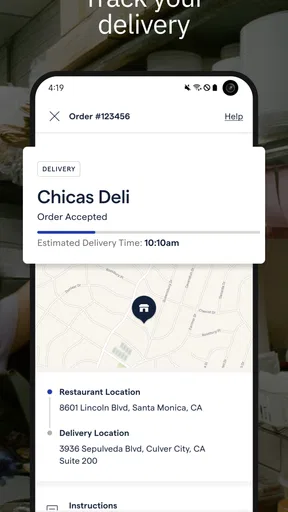
- Order tracking helps you follow delivery progress.
Cons
- Restaurant selection depends heavily on your city and local coverage.
- Delivery fees and service charges can increase the final cost.
- Some restaurants may have limited ordering hours on the app.
- Refunds or order changes may require contacting restaurant support.
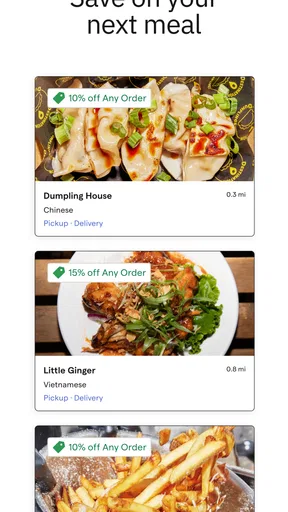
- Promotional offers and rewards can vary between participating restaurants.
FAQs for ChowNow: Local Food Ordering
What is ChowNow: Local Food Ordering, and how does it work?
ChowNow is a food-ordering platform that lets you browse participating local restaurants, view their menus, customize dishes, and place pickup or delivery orders. The service is designed to connect customers directly with independent restaurants rather than functioning only as a marketplace. Availability, ordering options, delivery coverage, fees, and estimated preparation times depend on the restaurant and your location.
Is ChowNow available in every city or at every restaurant?
No. ChowNow’s restaurant selection varies considerably by location, so the app may be more useful in supported cities and neighborhoods than in areas with limited coverage. After entering your address or selecting a location, you can see which restaurants offer pickup or delivery nearby. Some restaurants may appear for pickup only, while others may provide delivery through ChowNow or their own delivery arrangements.
What payment methods and additional fees should I expect?
Payment options and charges can differ depending on the restaurant, order type, and location. Before confirming an order, ChowNow normally displays the food subtotal, taxes, delivery charges when applicable, service-related fees, and any tip you choose to add. Review the complete checkout summary carefully, because minimum order requirements, delivery fees, and restaurant-specific charges may affect the final total.
Can I modify or cancel a ChowNow order after placing it?
Changes and cancellations are not always guaranteed once an order has been submitted. Restaurants may begin preparing food immediately, meaning a cancellation or modification could be refused or may require contacting the restaurant directly. If you notice an incorrect item, address, or special instruction, use the order details and support options as quickly as possible. Refund decisions can depend on the restaurant and order status.
Does ChowNow offer reliable order tracking and customer support?
ChowNow generally provides order information such as confirmation details, restaurant status, pickup instructions, or delivery updates when tracking is supported for that order. However, the level of tracking can vary between restaurants and delivery arrangements. If an order is delayed, incomplete, or incorrect, check the app’s help or support tools first, while remembering that the restaurant may remain responsible for preparation and fulfillment issues.


